Product Detail Pages: The Complete Guide To Design, UX, SEO and Conversion
Industry Insights
Updated on November 26, 2025
Have you ever hovered over the “Add to Cart” button and hesitated? That moment happens on the product detail page, and it’s where most ecommerce sales are won or lost.
Every element on this page from the first image and video to the last line of text, can either answer your questions or leave you confused.
Think of it as your digital sales assistant: it hosts everything shoppers need to know, including photos, descriptions, manuals, pricing and specifications, to make an informed buying decision.
By the end of this guide you’ll know how to build product detail pages that delight your customers, lift sell‑through rates and turn casual browsers into loyal buyers.
Why the Product Detail Page Matters
A product detail page is the web page where shoppers decide whether to purchase. It is the single most important page in an online store for winning sales, because all the signals that drive purchase decisions live here.
The best product pages present all the information customers need for an informed buying decision. That includes the product name, description, features, price, visual content like pictures and video, and other relevant information customers expect, like cost of shipping and inventory levels.
What is a Product Detail Page
A product detail page is a web page dedicated to a specific product sold on an ecommerce site. The detail page exists to answer questions, remove friction, and guide users through the buying process. When this page is complete, customers feel confident to purchase.
PDP vs PLP
A product listing page (PLP) shows a category view with multiple options. A product detail page (PDP) focuses on one specific product and provides all the details needed to increase conversions. A PLP steers potential buyers toward the right choice, while a PDP helps them complete the purchase.
The Amazon Product Detail Page Example
Amazon set the benchmark for e-commerce sites. A single product detail page typically includes stills of the product from different angles, a scannable description with bullet points, customer reviews, stock levels, options for shipping, and personalised recommendations for similar products. This is a good example of PDP design at scale.
UX Foundations for a Good Product Detail Page
Most customers browse on mobile devices. Responsive, fast-loading product detail pages with large tap targets minimise bounce rates, increase average order value (AOV) and improve conversion rates. Clear breadcrumbs help users jump back to the category without friction.
Show key features above the fold (and yes, this includes product videos and 3D models, so that users will see them). Make sure the product name, price, and add-to-cart button display clearly.
Rules Every Detail Page Should Follow
Consistency Across SKUs
Maintaining brand consistency helps build brand presence and help customers compare the same product across variants.
Transparency in Shipping Costs
Unexpected shipping costs are a top source of customer complaints and abandoned carts, so display shipping details early.
Returns and Warranties
Prominently show care instructions, return windows, and warranty details to build trust with potential customers.
The Essential Elements of a High-Converting Product Page
If you’ve ever visited an online shop, you know the basic layout and structure is essentially the same across the board. There is a homepage, linked to category pages, which link to the individual product pages.
This standard means that there are few areas where retailers can differentiate themselves. In cases where product descriptions are also controlled by brands, the only way to stand out is by making your product pages the go-to resource for shoppers looking for products.
Product Images and Product Videos
Effective product detail pages use multiple high-quality images and lifestyle shots to show real use. Include several angles and close-ups. Add product videos for complex ecommerce product categories like consumer electronics, sporting goods, or power tools.
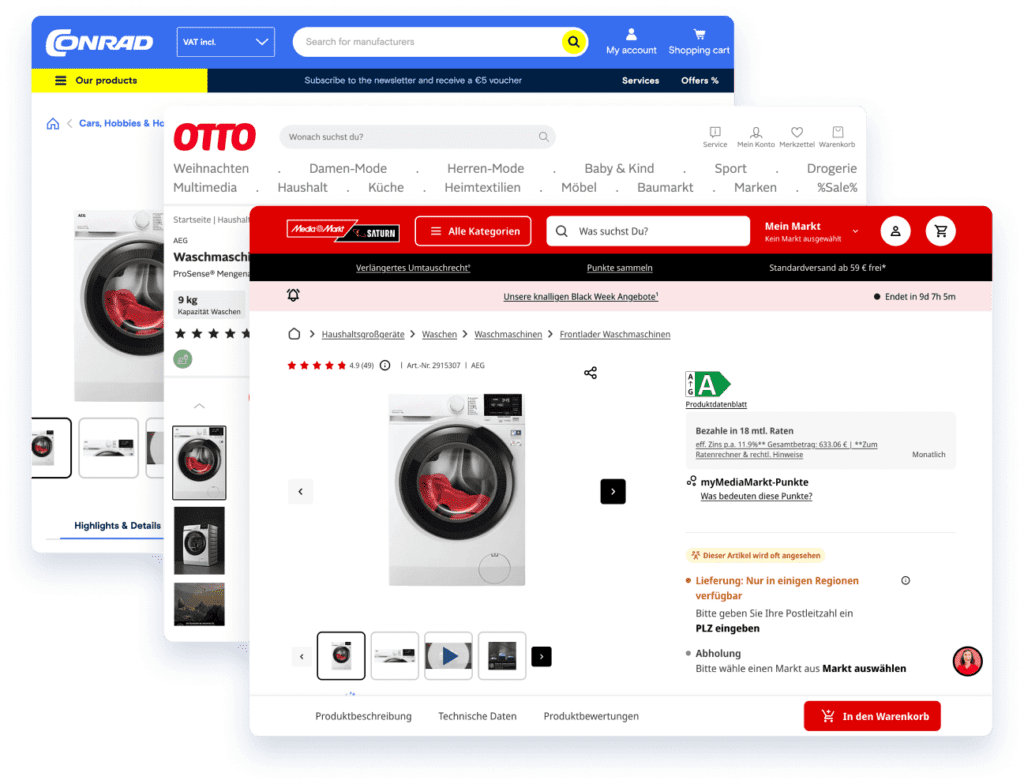
A single high-quality product image can lift trust quickly. Systems designed for eCommerce digital asset management can help you create unlimited versions from a primary file.
Product Description and Product Attributes
The cornerstone of all eCommerce product pages is the product description. Write a clear product description that describes the product in detail. Highlight product attributes, materials, and unique features. Use bullet points for product features and scannability.
If you can, optimize your product descriptions for search engine visibility. As we move into the age of AI, staying visible in search results increases your chances of getting mentions in large language models used by more and more members of your target audience every day.
Reviews and Social Proof
Show customer reviews, star ratings, and even the occasional bad review to build credibility. Other customers influence the buying decision more than brand copy.
Trust and Security
Badges, payment icons, and delivery guarantees reduce anxiety for site visitors during checkout and throughout the buying process.
Comprehensive Product Information
Beyond basic features, a product detail page should include technical specifications, size charts, materials, manufacturing details, sustainability notes and care instructions.
Presenting everything buyers need to know is not only great for managing product experiences, but also allows the same detail page to answer questions before they arise and keeps customers on your site. For apparel, include measurement guides and styling tips; for electronics, list compatible accessories and requirements.
Anticipating what other customers might ask builds trust and helps shoppers compare the same product across brands. High‑quality snapshots and descriptive captions reinforce these details visually.
Additional In-Depth Content
For today’s online shoppers, the essential components listed above are table stakes. There are several additional types of content you can include on your e-commerce website, including but not limited to:
- Product ratings
- User-generated content like review videos or social mentions
- Delivery information
- A “compare products” section
- Personalized recommendations
- Additional product recommendations or add-ons
- Complementary items
- Color options
- Care instructions
- Additional product details your competitors might not include
While this information is by no means required, the keye is to provide enough information about the product’s essential aspects that your visitors want to smash the CTA buttons instead of closing the window.
Designing the Layout
The layout should be engaging, yet not overload the viewer. The design you create should present all the relevant information in a concise, visually engaging way. This means featuring high-quality images in your product gallery, useful information in the A+ content, and pricing at a minimum.
However, modern online shoppers are not easily satisfied. It’s not enough to simply provide more in-depth and useful content, though this is one of the core components. The design must also present the content and product data in a way that site visitors cannot resist.
Common layouts
On desktop, many online shops use a two-column layout with the gallery on the left and details on the right. On mobile devices, these sites stack elements and keep the CTA visible.
Below the fold, A+ content (which gets its name from what Amazon calls the section) provides more context and information. This area often includes more detailed visuals than what is normally shown in the gallery, product usage manuals, and awards.
In most shops, the next section includes the technical specifications and product descriptions, which are crucial for LLMs and SEO rankings.
Lastly, many product pages display a “People Also Viewed” or “People Also Buy” section to increase the chances for upselling or cross selling complementary products.
CTA Placement
Keep the Add-to-Cart button visible. A sticky CTA helps users complete the purchase without scrolling back up.
Options and Variants
Make size, colour, and material selectors obvious. Show real-time availability of products by variant to avoid frustration and support faster purchase decisions.
Common Mistakes to Avoid
Hiding shipping information until checkout, inconsistent pricing and overstuffed paragraphs frustrate users and increase bounces.
Missing or low‑resolution product pictures, especially those that fail to show multiple angles, undermine trust. Avoid intrusive pop‑ups on mobile devices, keep advertising discreet, and ensure the CTA buttons remain visible but unobtrusive.
Make sure your product pages load quickly on mobile devices, with sufficient colour contrast and proper alt text to reduce customer complaints.
Best Practices for Conversions
While the above outlines the basic requirements for a product detail page, there is often more you can do to convert. Here are some of the ways online shops can go above and beyond to make more sales.
Personalised Recommendations
Offer personalised recommendations and similar products to raise average order value and help users find the same specific product in the right fit or finish.
Test What Matters
To A/B test variants of your product pages, experiment with product titles, descriptions, and CTA placement. Small changes on the detail page can create higher conversion rates at scale.
Speed and Core Web Vitals
Slow pages increase bounce rates. Optimise images, code, and caching to keep the page fast across devices.
SEO and Structured Data
Use keywords in product titles and descriptions. Add schema so search engines can show price, reviews, and other details in rich results.
Keeping Up with Accessibility and Compliance Laws
The 2020s are proving to be one of the most groundbreaking in terms of digital accessibility. More countries and regions are developing, implementing, and enforcing laws that require consumer facing websites and apps to be fully accessible to people with disabilities.
EAA Requirements
As of June 2025, ecommerce sites must meet European Accessibility Act (EAA) rules. The cost of ignoring compliance is fines and lost sales, so design your site with accessibility in mind now.
Readability and Contrast
Meet WCAG 2.1 Level AA guidelines for contrast, typography, and spacing so all users can read key details. This should be your minimum target. We put together a guide so you can see how you can meet the guidelines and comply fully with new laws and regulations
Alt Text and Keyboard Support
Add alt text to product images and subtitles, transcripts, and audio descriptions to videos. Ensure full keyboard navigation and link to help pages that include all the information customers need (check out our page on making your videos accessible for more).
Content Strategy Tips for Search and Sales
For most online shops, the competition isn’t on the product pages themselves, but rather the battle to be in first place in the search rankings. Here are some tips you can use to improve your content strategy to rank higher in search, get mentioned in LLMs and generate more sales.
1. Create PDPs that Answer Real Questions
Write to how potential customers shop. Include specifications, size guides, instructions, and shipping information in plain language.
2. Use a Consistent Voice and Structure
Repeat the same section order on every page so users can find details fast. This consistency improves brand presence and confidence.
3. Add Pictures and Media that Support Decision Making
Balance lifestyle images with functional shots. Show scale, materials, and use cases. Use captions when they add clarity.
4. Weave in the Terms Buyers Search
Place relevant keywords in the product title, first paragraph of the product description, and image filenames. This helps search engines understand the page and helps customers scan.
Shipping, Returns and Service Information
Explain shipping options, costs, delivery windows, and pickup choices. Place information about shipping near the price and CTA so users do not hunt for them. Add email notifications for dispatch, delivery, and back-in-stock events to keep customers informed.
Create and publish a clear return policy and warranty summary on the detail page. Link to a longer policy for other relevant information customers might need later.
Image and Video Checklist
- Various angles and close-ups for texture and finish
- One high quality product image as the hero
- Lifestyle pictures that show the product in context
- Short videos that explain complex features
- Zoom, 3D, or AR if relevant to the ecommerce product category
- Fast loading via dedicated image and video CDN
Trust, Proof and Persuasion
- Display customer ratings and reviews with volume
- Do not hide a bad review if it is honest and constructive
- Add social proof like awards and third-party seals
- Show how many users have purchased or saved the item recently
Measure and Iterate
Measuring the performance of each specific product detail page is one of the most important pieces of the puzzle because it can provide important context clues into how your audience is viewing your design.
Some data you should consider collecting:
- Conversion rates
- Bounce rates
- Dwell time
- Scroll depth
- Variant selection
- Add‑to‑cart conversions.
This lets you segment users by traffic source or return status and examine micro interactions, such as clicking on image thumbnails, watching videos or expanding attributes, to see how visitors engage with the detail page.
To help with conversions, use A/B testing to experiment with price presentation, product titles and the placement of size charts or testimonials.
Continual optimisation helps uncover changes that drive higher conversion rates on your online store.
Real-World Examples
- Electronics PDP: Apple’s pages combines clean pictures, detailed specifications, and videos. A good example to study.
- Fashion PDP: Zara uses lifestyle pictures, clear product descriptions, and maintenance instructions to reduce returns.
- What not to do: Hiding shipping information, failing to show product availability, or omitting customer reviews leads to higher bounce rates.
Final Checklist Before You Publish
- Product titles are precise, with relevant keywords
- Price, shipping costs, and shipping options are visible near the CTA
- Product availability updates in real time by variant
- Product pages share a consistent structure across the site
- Images cover different angles and include at least one high resolution product image
- Reviews and social proof are present and authentic
- Care instructions and warranty details are linked on the page
- Help pages cover all the information that does not fit on the PDP
- Email notifications are set for restock and shipping updates
- Page speed is green on Core Web Vitals
- Schema types for Product, Offer, and AggregateRating are in place
Closing Thoughts
A well‑crafted product detail page is more than a place to display product images and a product description. It is a conversation that guides customers through discovery, comparison and checkout.
When you prioritise clarity, accessibility, relevance and trust, your product pages will improve conversion and repeat sales. Continue testing and refining your approach; an excellent detail page is your strongest digital salesperson and a key growth lever for your online store.
Frequently Asked Questions
It is the web page that focuses on one specific product and presents all the information needed for purchase. It is also called a product detail page PDP.
You can get content for your PDP in several ways, some more complex than others. Here is an overview of hte most common options:
Get the content directly from brands using portals or email.
Source the content from public facing sites like YouTube.
Use a content provider like DemoUp Cliplister.
DemoUp Cliplister provides PDP content using a simple JavaScript snippet embedded into your online shop’s header. Whether a brand with a D2C site or a B2C retailer, this snippet will display all the relevant content in the network directly in the product gallery.
A PLP is a category page with many items. A PDP is a single, specific product detail page with information that helps drive conversions.
Yes, written PDP content like descriptions and visual content like videos significantly increase conversion rates. Some studies indicate that video on a product detail page can increase conversion rates by up to 83%.
Yes, product reviews can increase the chances of the sale online anywhere between 18% and 380%. Moreover, a famous study indicates that over 99% of people who have made a purchase online in their lifetime cite reviews played a role in their decision.

Better Content. More Sales.

Fill out the form to discover our end-to-end eCommerce content solutions for brands & shops